
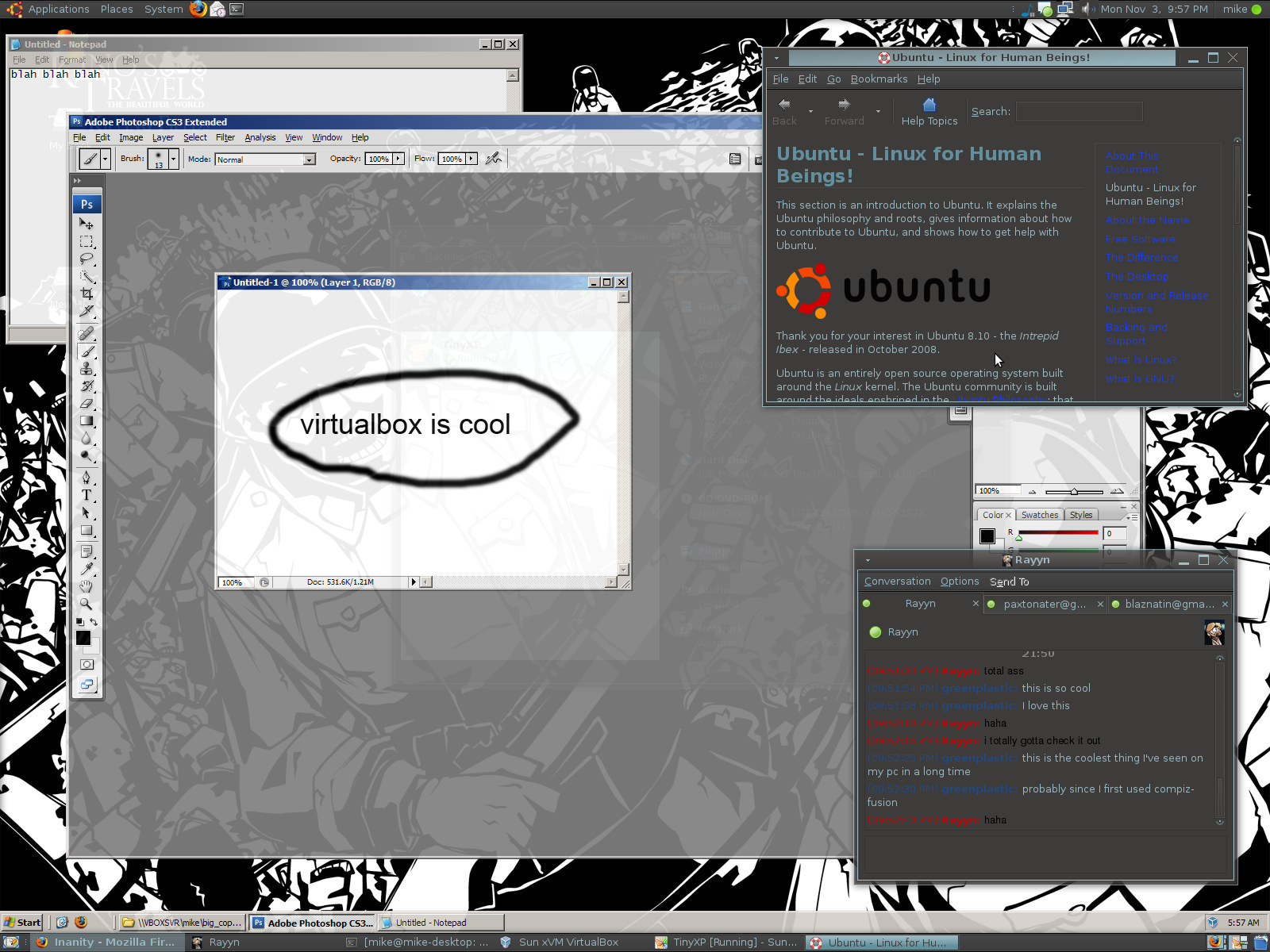
VirtualBox running in Gnome + Compiz
I’ve tried VirtualBox’s seamless mode in the past and had mixed results. It worked well enough last time I tried it in Ubuntu 7.10, but it didn’t play well with compiz-fusion. Now, having updated to Ubuntu 8.10 and the newer versions of various programs it comes with, I thought I’d try again, and I was amazed at how well it worked.
As you can see in the screenshot, seamless mode integrates the guest OS’s applications (in this case Windows XP) into the host OS (in this case, Linux), so that they look and act somewhat like native applications. In the screenshot you can see them working right along side eachother. The integration into compiz isn’t perfect (you can’t use scale to switch between the Windows applications or drag Windows apps to other desktops, for example), but it does work extremely well. It just works out of the box, and allows me to run any Windows application I want right from inside Linux.
Here’s how I did it:
- Download and install the package from VirtualBox’s website. I installed the Ubuntu 8.04 AMD64 deb, since there was no package for 8.10.
- Create a new virtual machine. I used 512mb or RAM, 10mb of video RAM, and a 10gb dynamic ntfs hd image.
- Install XP (I used TinyXP rev. 9). You can do this by mounting the CD image, or by using your cd drive. Once the CD is mounted, just start the virtual machine and install XP normally.
- Install the guest additions. It mounts a cd with the installer on it — just run that and reboot the VM. Around this time I also added some shared folders, which you can access in XP via My Network Places -> Entire Network -> VirtualBox Shared Folders.
- Turn on seamless mode and enjoy.
That’s all I had to do, and it worked wonderfully. No weird hacks or anything. I didn’t even have to edit a configuration file.
This is virtualization, so it’s slower than running native applications, but it’s so damn convenient I don’t care. I have my fingers crossed for 3d hardware acceleration support in the future.

How much physical ram does your machine have?
My machine has 2gb of physical RAM.
What sort of graphics card are you using? I have nvidia Geforce and I am scared to make the 8.10 jump.
I have an 8800gt, and I installed the drivers painlessly with Ubuntu’s Restricted Driver Manager.
The Intrepid Ibex package was released today, check it out:
http://dlc.sun.com/virtualbox/2.0.4/virtualbox-2.0_2.0.4-38406_Ubuntu_intrepid_i386.deb
Virtualization != noticeably sluggish applications
VirtualBox just doesn’t always make use of the best optimizations to date (VT, VTd, SVM, etc.)
Wow, i didn’t know that you can “merge ” both operatives systems..
Now that i had seen this i wanna use Kubuntu again! xD